output: github_document
knitr::opts_chunk$set(
  collapse = TRUE,
  comment = "#>",
  fig.path = "man/figures/README-",
  out.width = "100%"
)
options(tibble.print_min = 5, tibble.print_max = 5)
dplyr 


Overview
dplyr is a grammar of data manipulation, providing a consistent set of verbs that help you solve the most common data manipulation challenges:
mutate()adds new variables that are functions of existing variablesselect()picks variables based on their names.filter()picks cases based on their values.summarise()reduces multiple values down to a single summary.arrange()changes the ordering of the rows.
These all combine naturally with group_by() which allows you to perform any operation "by group". You can learn more about them in vignette("dplyr"). As well as these single-table verbs, dplyr also provides a variety of two-table verbs, which you can learn about in vignette("two-table").
If you are new to dplyr, the best place to start is the data transformation chapter in R for Data Science.
Backends
In addition to data frames/tibbles, dplyr makes working with other computational backends accessible and efficient. Below is a list of alternative backends:
-
arrow for larger-than-memory datasets, including on remote cloud storage like AWS S3, using the Apache Arrow C++ engine, Acero.
-
dbplyr for data stored in a relational database. Translates your dplyr code to SQL.
-
dtplyr for large, in-memory datasets. Translates your dplyr code to high performance data.table code.
-
duckplyr for large, in-memory datasets. Translates your dplyr code to high performance duckdb queries with zero extra copies and an automatic R fallback when translation isn’t possible.
-
sparklyr for very large datasets stored in Apache Spark.
Installation
# The easiest way to get dplyr is to install the whole tidyverse:
install.packages("tidyverse")

# Alternatively, install just dplyr:
install.packages("dplyr")
Development version
To get a bug fix or to use a feature from the development version, you can install the development version of dplyr from GitHub.
# install.packages("pak")
pak::pak("tidyverse/dplyr")
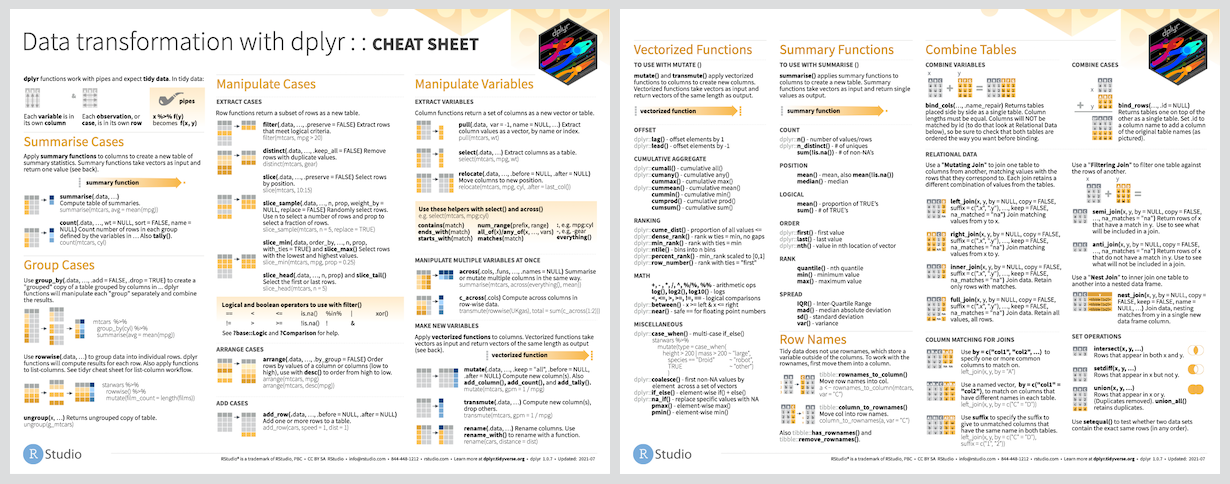
Cheat Sheet
Usage
library(dplyr)

starwars |>
  filter(species == "Droid")

starwars |>
  select(name, ends_with("color"))

starwars |>
  mutate(name, bmi = mass / ((height / 100)^2)) |>
  select(name:mass, bmi)

starwars |>
  arrange(desc(mass))

starwars |>
  group_by(species) |>
  summarise(
    n = n(),
    mass = mean(mass, na.rm = TRUE)
  ) |>
  filter(
    n > 1,
    mass > 50
  )
Getting help
If you encounter a clear bug, please file an issue with a minimal reproducible example on GitHub. For questions and other discussion, please use forum.posit.co.
Code of conduct
Please note that this project is released with a Contributor Code of Conduct. By participating in this project you agree to abide by its terms.