ASP.NET Core Front-end + 2 Back-end APIs on Azure Container Apps
This repository contains a simple scenario built to demonstrate how ASP.NET Core 6.0 can be used to build a cloud-native application hosted in Azure Container Apps. The repository consists of the following projects and folders:
- Catalog API - this is an ASP.NET minimal API project with one endpoint.
- Orders API - this is an ASP.NET minimal API project with one endpoint.
- UI - an ASP.NET Blazor Server app that calls out to both the Catalog and Orders API and renders their status.
deployfolder - this folder contains a series of Azure Bicep templates that can be used to create the application and deploy it.setup.ps1- this file is a one-stop way for you to deploy the app to your own Azure subscription so you can try the scenario.
Prerequisites
- .NET 6.0
- The Azure CLI
- An Azure subscription
- Docker
- PowerShell (GitHub Actions will replace this prerequisite soon)
Setup
- Clone this repository.
- Sign in to your Azure subscription using the
az logincommand. - If you have more than 1 Azure subscription, make sure you're targeting the right Azure subscription by using the
az account showandaz account set -s <subscription-id>commands. - From the root of this repository, run
./setup.ps1.
Topology diagram
The resultant application is an Azure Container Environment-hosted set of containers - the catalog API, the orders API, and the frontend Razor Pages front-end.
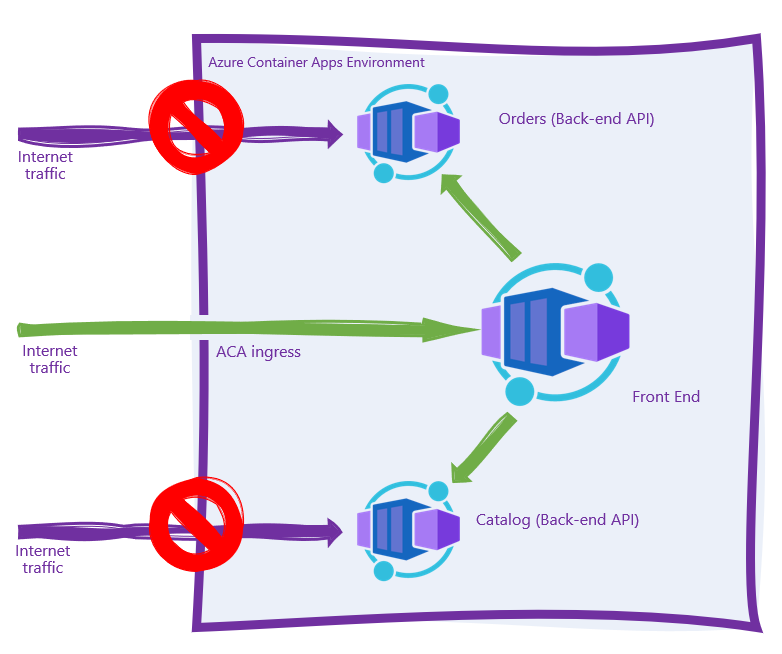
Internet traffic should not be able to directly access either of the back-end APIs as each of these containers is marked as "internal ingress only" during the deployment phase. Internet traffic hitting the frontend.<your app>.<your region>.azurecontainerapps.io URL should be proxied to the frontend container, which in turn makes outbound calls to both the catalog and orders APIs within the Azure Container Apps Environment.