Stubhub API
A Python wrapper for the stubhub inventory search API. You can see the full tutorial in the Stubhub API.ipynb
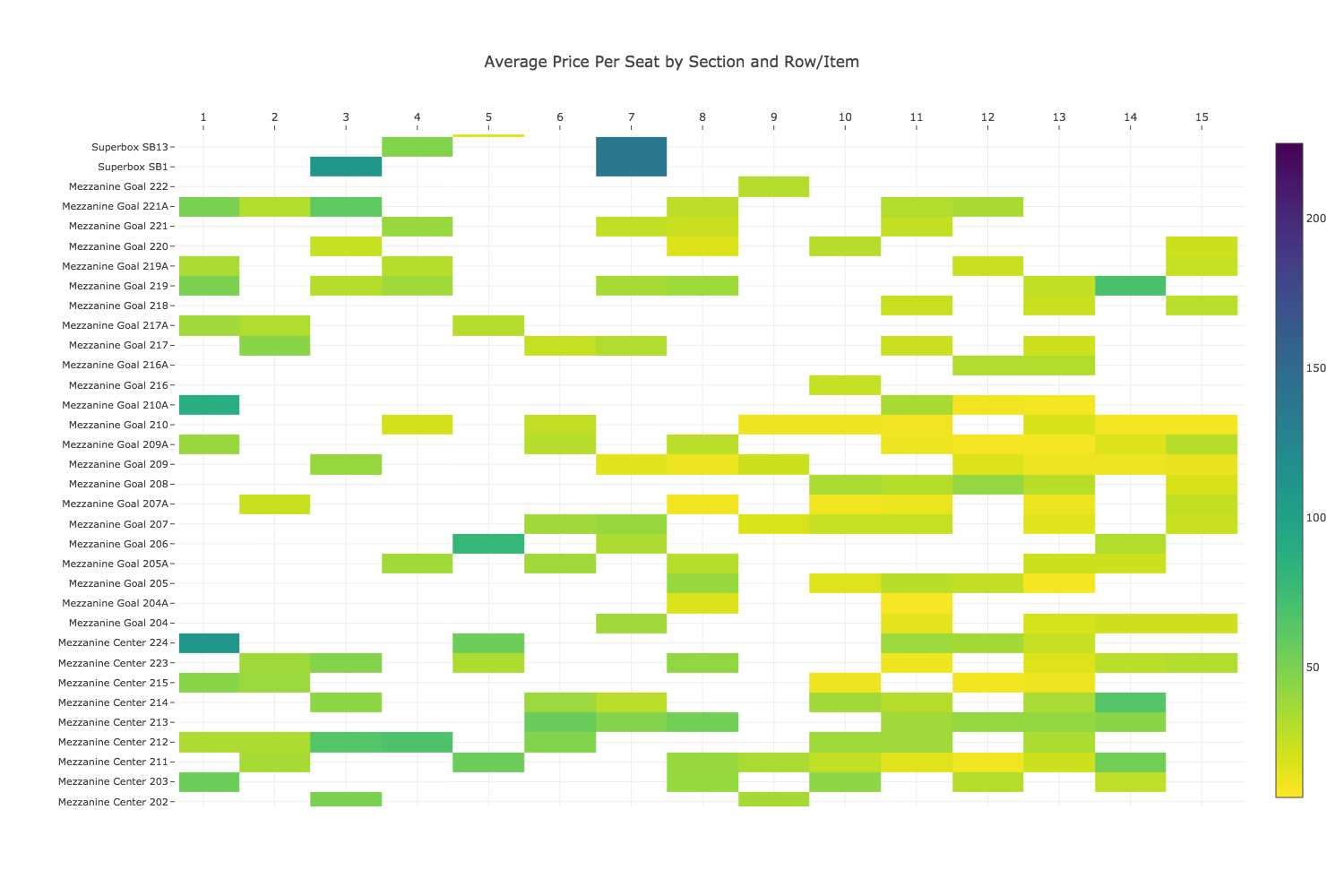
Getting Started
from stubhub_scraper import St

import pandas as pd
import numpy as np

## Enter user's API key, secret, and Stubhub login
app_token = '7131e534-bbec-374f-b1e4-1bdf6909a8ee'
consumer_key = 'jC475_MWRt6VV0aRz6nhA4Kpfloa'
consumer_secret = 'U7bW44Spj64CDYwUQSofJaMh1zka'
stubhub_username = ''
stubhub_password = ''

st = St(app_token,consumer_key,consumer_secret,stubhub_username,stubhub_password)
b'{"access_token":"254gce9e-3abd-3274-9d1f-13b7c3bf96b2","refresh_token":"1fdrf277-ac54-3d8d-b59b-58aa1482f7f4","scope":"default","token_type":"Bearer","expires_in":14846462}'
If authentication is succesfull you will see a message similar to above with your access token.
Single event
# San Antonio at Golden State game on March 19th 2018
listings = st.get_listings(103138286,pages=True)
listings[0]
{'currentPrice': 46.9,
 'dirtyTicketInd': False,
 'listingId': 1314761532,
 'listingPrice': 37.0,
 'quantity': 2,
 'retrieveTime': '2018-03-17 20:21:08',
 'row': '14',
 'score': 0.0,
 'seatNumbers': '1;2',
 'sectionId': 127168,
 'sectionName': 'Balcony Corner 229',
 'sellerSectionName': '229',
 'zoneId': 7453,
 'zoneName': 'Balcony Corner'}
# Number of listings
len(listings)
298
listings is a list of dictionaries one of which you can see above. You can convert it to a dataframe and save as a csv.
listings = pd.DataFrame(listings)
listings.head()
listings.to_csv('SpursvsWarriors 2018-3-19.csv')
| currentPrice | dirtyTicketInd | listingId | listingPrice | quantity | retrieveTime | row | score | seatNumbers | sectionId | sectionName | sellerSectionName | zoneId | zoneName | |
|---|---|---|---|---|---|---|---|---|---|---|---|---|---|---|
| 0 | 46.90 | False | 1314761532 | 37.00 | 2 | 2018-03-17 20:21:08 | 14 | 0.0 | 1;2 | 127168 | Balcony Corner 229 | 229 | 7453 | Balcony Corner |
| 1 | 50.49 | False | 1314385851 | 39.99 | 2 | 2018-03-17 20:21:08 | 13 | 0.0 | 20;21 | 127149 | Balcony Baseline 201 | 201 | 7454 | Balcony Baseline |
| 2 | 50.50 | False | 1284451304 | 40.00 | 2 | 2018-03-17 20:21:08 | 13 | 0.0 | 13;14 | 127156 | Balcony Corner 204 | Balcony Corner 204 | 7453 | Balcony Corner |
| 3 | 56.50 | False | 1314437278 | 45.00 | 3 | 2018-03-17 20:21:08 | 18 | 0.0 | General Admission | 127166 | Balcony Corner 227 | 227 | 7453 | Balcony Corner |
| 4 | 57.70 | False | 1314744154 | 46.00 | 2 | 2018-03-17 20:21:08 | 15 | 0.0 | 7;8 | 127166 | Balcony Corner 227 | 227 | 7453 | Balcony Corner |
Multiple events
To download listings for multiple events use get_listings_by_event function that takes the events parameter which is a pandas dataframe with event name and id in the following format.
events = pd.read_csv('flyers events 2018.csv')
events
| Event | Eventid | |
|---|---|---|
| 0 | Washington Capitals 3/18/2018 | 103045481 |
| 1 | New York Rangers 3/22/2018 | 103045437 |
| 2 | Boston Bruins 4/1/2018 | 103045191 |
| 3 | Carolina Hurricanes 4/5/2018 | 103045229 |
| 4 | New York Rangers 4/7/2018 | 103045439 |
Let's get listings for the rest of Philadelphia Flyers home games in 2017-2018 season.
flyers = st.get_listings_by_event(events)
Event: New York Rangers 4/7/2018: : 5it [00:22,  4.52s/it]

Done getting listings by event.
flyers.head()
| currentPrice | dirtyTicketInd | listingId | listingPrice | quantity | retrieveTime | row | score | seatNumbers | sectionId | sectionName | sellerSectionName | zoneId | zoneName | Event | Date | |
|---|---|---|---|---|---|---|---|---|---|---|---|---|---|---|---|---|
| 0 | 58.30 | False | 1314733573 | 46.50 | 2 | 2018-03-17 20:21:20 | 12 | 0.0 | 7;8 | 30197 | Mezzanine Goal 219A | UPPER:219A | 7747 | Mezzanine Goal | Washington Capitals 3/18/2018 | 3/18/2018 |
| 1 | 58.90 | False | 1314520843 | 47.00 | 2 | 2018-03-17 20:21:20 | 13 | 0.0 | NA | 30190 | Mezzanine Goal 210A | UPPER:210A | 7747 | Mezzanine Goal | Washington Capitals 3/18/2018 | 3/18/2018 |
| 2 | 58.90 | False | 1314471076 | 47.00 | 2 | 2018-03-17 20:21:20 | 8 | 0.0 | 15;16 | 30199 | Mezzanine Goal 221 | UPPER:221 | 7747 | Mezzanine Goal | Washington Capitals 3/18/2018 | 3/18/2018 |
| 3 | 58.90 | False | 1314718454 | 47.00 | 2 | 2018-03-17 20:21:20 | 11 | 0.0 | NA | 30181 | Mezzanine Goal 205 | UPPER:205 | 7747 | Mezzanine Goal | Washington Capitals 3/18/2018 | 3/18/2018 |
| 4 | 60.09 | False | 1314008638 | 47.99 | 2 | 2018-03-17 20:21:20 | 11 | 0.0 | 11;12 | 30193 | Mezzanine Goal 217 | UPPER:217 | 7747 | Mezzanine Goal | Washington Capitals 3/18/2018 | 3/18/2018 |
pd.unique(flyers['Event'])
array(['Washington Capitals 3/18/2018', 'New York Rangers 3/22/2018',
       'Boston Bruins 4/1/2018', 'Carolina Hurricanes 4/5/2018',
       'New York Rangers 4/7/2018'], dtype=object)
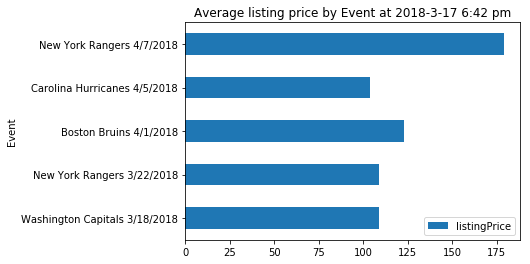
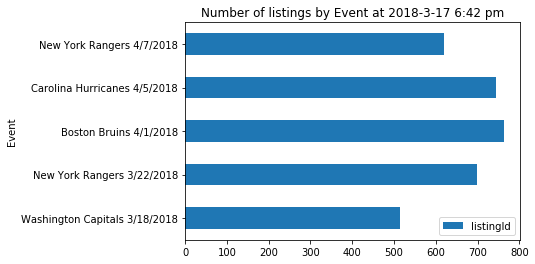
Let's also look at the number of listings.
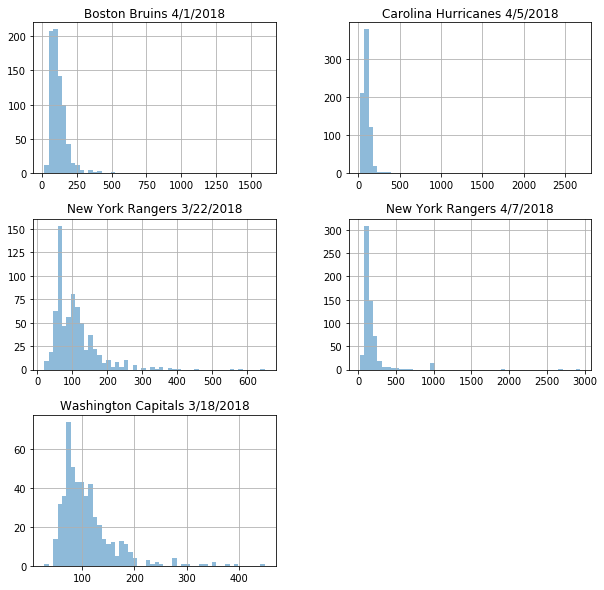
Below is a good visual to see how spread out the prices by event are.
Reference
get_listings(eventid, pages=False) - Get listings using Stubhub API.
Parameters:
eventid(int) - eventid taken from the Stubhub event url.pages(bool) - if True paginate to get all listings. If False get 200 listings.
get_listings_by_event(events) - Given the list of events and event ids retrieve all the listings for each event .
Parameters:
events(pandas DataFrame) - a pandas dataframe of events and event ids taken from stubhub.